Keyboard shortuct not responding until opening Mosaic Preferences

Hi,
First your app rules !
It's my favorite choice to manage window app size on my mac.
I've a Pro Edition since several years now.
Since the last update, I've to pay again my license again because my account seems to not exist at all.
But it's not the subject here.
Since this update, Mosaic do not react when I use my keyboard shortcut.
To fix that, I need to open my Mosaic preferences and then my shortcuts are working again.
I hope you can reproduce this situation and fix it.
Best regards,
Thomas Hermant.
-

My keyboard shortcuts have stopped working. when I tried to reset my keyboard shortcuts so that they would work, I noticed the preferences box was messed up with the NAME becoming the keyboard shortcut and the Keyboard Shortcut becoming a drop down listing which screens to apply a setting to.
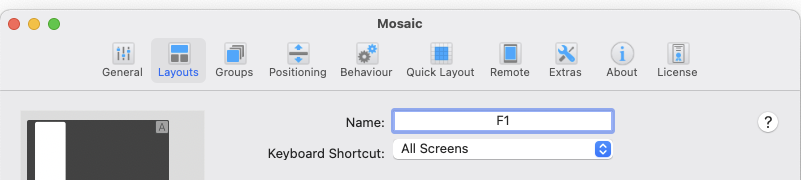
-

Same here (macOS 10.15.7, iMac (late 2015). Update to 1.3.1 nearly completely screwed up the shortcuts.
Strange thing #1: some keystrokes are okay, most are not.
Strange thing #2: version 1.3.1 required a re-entry of the serial number. I can't remember that prior versions asked for that.
[EDIT, 2021-07-05: This is not a new behaviour, it was the same in version 1.2.6. "Strange thing #3: Clicking on the name of the setting does not give a highlighted cursor, but change of the name are being taken."]
It used to be the GREATEST and MOST HELPFUL piece of software for me. Now it seems, this version is a TOTAL FAILURE ...
Where do I find the previous version(s)?
[UPDATE 2021-07-05: I reverted to Mosaic version 1.2.6. which offers full functionality again. The support receives 0 stars out of 5 for totally ignoring all requests here! It's a shame.]
-
New version 1.3.2 out now: it says to fix the above mentioned problems. Installed it on one iMac so far for tests. Seems to be working, further tests are personally needed to be on the safe side. I will report.
[Update 2021-09-06]: 1.3.2 is still buggy, I stay with 1.2.6 on macOS 10.15.7


Please sign in to leave a comment.
Comments
8 comments